
[Part 5] Production Database Migration or Modernization: A Comprehensive Planning Guide

In this fifth and the final post in our guide, we will cover a sample database migration project plan and will discuss the key lessons learned based on our extensive experiences with 10GB to 100TB+ migrations.
We highly recommend reading the previous posts in the series:

9. Sample Migration Plan: RDBMS to NoSQL
To "ground" the concepts that we discussed in past posts, let's describe a realistic migration example:
Scenario Overview
A financial services company operates a backend API service with these characteristics:
220GB relational database with 12 tables
Java monolith using Hibernate with tight database coupling in places
Several dozen API endpoints supporting web and mobile clients
Nightly batch jobs and Databricks data pipelines
Event streaming via Kafka for some of the operations
Data must be denormalized for the target NoSQL database, no stored procedures or triggers currently in use.
The service is busy during banking hours (6am-6pm), otherwise mostly idle except for heavy batch jobs around 3am. Of course, this being a banking client, there's exactly zero tolerance for data integrity issues.
They've selected a NoSQL database for better horizontal scalability and chosen Adiom's Dsync for migration based on its RDBMS to NoSQL transformation capabilities and CDC support.
Phase 1: Planning and Design (2-4 weeks, extended to 6-7 weeks)
Initial timeline: 2-4 weeks.
The team begins by mapping the current relational schema to a denormalized NoSQL model, identifying which tables should become embedded documents versus separate collections.
Architecture review board approval, vendor consultant coordination, and executive stakeholder presentations generally consume more time than anticipated.
Network constraints surface during planning - the source database sits in an on-premises data center while the target will be Cloud-based, requiring careful private link configuration and security review.
Based on the initial testing, Dsync can migrate their 220GB database in approximately 4 hours, enabling a straightforward weekend migration window with a sufficient user notification. Dsync's CDC capabilities mean they don't need to worry about capturing changes during migration.
The team decides to implement reverse sync for critical tables as a risk mitigation strategy - changes on the new database will flow back to the old system during a two-week validation period after cutover, allowing them to revert if issues arise. Batch jobs need to be accounted for separately in the rollback scenario. The team evaluates complete replay as well as capturing the changes as part of the Dsync reverse flow.
Due to lack of documentation and numerous undocumented dependencies discovered in the codebase, this phase extends an additional 2-3 weeks beyond the original estimate.
Phase 2: Environment Setup and Tooling Preparation (1-3 weeks)
The team provisions the target NoSQL cluster in their Cloud environment, configures Dsync with access to both source and target databases, and establishes monitoring and alerting.
DNS issues with private links consume several days of troubleshooting. Security team reviews and permission grants take longer than expected, but by week 3 all infrastructure is operational.
Phase 3: Code Changes and Dev Testing (2-3 months)
This phase involves substantial parallel engineering effort across four streams:
Stream 1: Data Access Layer Refactoring - Engineers create a clean DAL interface abstracting all database operations. They systematically refactor the monolithic codebase to route all data access through this interface rather than making direct database calls. They then build a NoSQL implementation of the DAL. This work represents the largest engineering investment in the migration.
Stream 2: Batch Jobs and Pipeline Updates - The team updates nightly batch jobs and Databricks pipelines to work with the denormalized NoSQL schema. Several "surprises" emerge - aggregations that were simple SQL queries now require multiple steps, and some join patterns need complete rethinking.
Stream 3: Forward Data Migration and Transformation - Using Dsync in the dev environment, the team tests data migration and transformation logic repeatedly. They refine mappings, test performance, and optimize the target database configuration. Initial migrations take 6+ hours; after tuning they achieve 3-hour migration times in dev.
Stream 4: Reverse Sync Testing - The team configures and tests reverse transformations, ensuring changes made in the NoSQL database can flow back to the relational source. This provides confidence in their safety net strategy. Rollback of batch jobs is tested separately.
Phase 4: UAT Testing (1-2 months)
UAT environment contains roughly half of production data volume (110GB). The team conducts extensive functional testing with business users, performance testing under realistic load, and capacity planning.
They discover that their initial target database configuration is undersized for peak load and adjust accordingly. Batch jobs complete successfully, though some require optimization to meet their time windows.
Several data model artifacts surface in UAT that weren't present in dev's smaller dataset -older records with different encoding, legacy status values no longer in use, and some foreign key relationships that exist in data but aren't properly constrained. These findings drive updates to transformation logic.
Phase 5: Production Dry Run (1 month, with issues extending timeline further)
The team executes a complete migration using full production data (220GB) with Dsync's CDC maintaining continuous sync. Application servers run against the migrated data in parallel with production traffic going to the old database.
This reveals critical issues that didn't appear in smaller environments. Old production records - some dating back 15+ years - contain data type inconsistencies and encoding problems that break transformation assumptions. In a handful of records, several fields that are expected to be dates contain text values. The target schema must be adjusted to handle these cases, which requires updating transformation logic, batch jobs, and the application DAL implementation. These changes propagate back through dev and UAT environments for validation.
The dry run validates migration timing and infrastructure capacity - actual production migration takes 4.5 hours, which is within acceptable bounds. It also reveals that one less-frequently-used API endpoint has 10x higher latency with the new database - investigation shows a missing index that was implicit in the relational schema.
Issues discovered in the dry run extend this phase and push back the planned cutover date by two weeks.
Phase 6: Cutover Preparation (1-2 weeks)
With all dry run issues resolved, the team builds a minute-by-minute cutover plan for a Saturday night/Sunday morning window. They assign specific responsibilities, prepare rollback procedures, and draft user communications. The plan includes checkpoints at 30-minute intervals with go/no-go decisions.
Internal users receive two weeks' notice, external users receive one week's notice of the planned maintenance window. Customer support receives detailed talking points and FAQs.
Phase 7: Production Migration and Cutover (2 days)
Friday evening, the team begins final preparations. They check the health of all the services and endpoints, the source and the destination. No surprises.
Saturday at 11pm, they initiate the migration following their detailed runbook:
10.45pm - Final health-check before initiating the migration
11:00pm - Enable read-only mode on the source database and pos
11:05pm - Begin full data migration with Dsync
3:20am - Data migration completes (4h 15m actual time)
3:25am - Automated validation scripts run
4:10am - Validation completes with complete match accounting for expected differences in concurrent data from batch jobs
4:15am - Switch application configuration to new database and deploy new batch process
4:30am - Smoke tests pass
4.30am - GO/NO-GO Decision
4:40am - Enable reverse sync from NoSQL to RDBMS (safety measure)
4:45am - Begin gradual traffic ramp-up
6:00am - Full traffic on new database
8:00am - Business users begin validation
Monday morning passes smoothly with banking hours traffic. By Monday evening, the migration is declared successful. Next Saturday afternoon, after a week of operation, the team disables reverse sync and formally decommissions the legacy system.
Phase 8: Post-Migration Monitoring and Optimization (1 month)
During the first week, monitoring reveals one forgotten index needed by a weekly report job - easily remedied. The team makes several configuration optimizations based on production query patterns. By week four, all performance metrics meet or exceed targets, and the team transitions to normal operational monitoring.
Timeline Summary:
Planning and Design: 6-7 weeks (2-4 weeks initially planned)
Environment Setup: 3 weeks
Code Changes and Dev Testing: 3 months
UAT Testing: 1 month
Production Dry Run: 1.5 months (1 month initially planned, extended due to issues)
Cutover Prep: 2 weeks
Cutover Execution: 2 days
Post-Migration: 1 month active monitoring and optimization
Total: Approximately 8 months from kickoff to completion
10. Lessons Learned and Conclusion
Biggest Bottlenecks
Migration tooling
Code changes
Overhead of communication and scheduling
Even with a tool like Dsync and minimum required code changes, it's not uncommon for migration timelines to extend when coordination between multiple teams is needed. In most cases it can't be helped, but it pays off to be realistic in planning the budget and setting expectations with broader stakeholders.
Common Pitfalls to Avoid
Underestimating the time required for dependency discovery and stakeholder alignment - add buffer to early phases
Assuming test data represents production reality - data quality issues lurk in old records
Skipping the production dry run to save time - this is where the most expensive issues are caught
Inadequate monitoring and alerting - you can't fix what you can't see
Poor communication with stakeholders - silence creates anxiety and distrust
Success Factors
Executive sponsorship and clear prioritization ensure teams can focus on migration work without competing demands
Comprehensive testing at each phase catches issues when they're cheaper to fix
Realistic timeline estimates with built-in buffer accommodate inevitable surprises
Strong collaboration between engineering, operations, and business teams keeps everyone aligned
The right tools for the job - whether vendor solutions like Dsync or custom scripts -dramatically affect success probability.
Next Steps and Resources
If you're planning a database migration, start with thorough assessment. Understand your requirements, constraints, and risk tolerance. Engage stakeholders early. Consider proof-of-concept migrations with subsets of data to validate your approach.
For complex migrations, especially RDBMS to NoSQL transformations, specialized tools can significantly reduce risk and timeline. Adiom's Dsync, for example, was purpose-built for these challenging scenarios.
How Dsync Helps
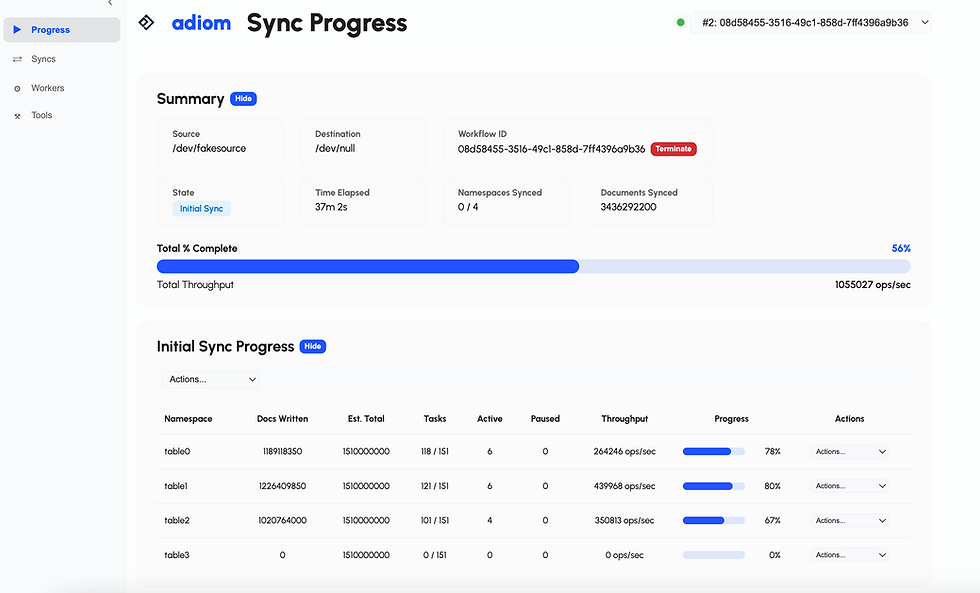
Dsync addresses many of the pain points in database migrations through seamless integration between initial data copy and real-time CDC, resumability, observability, sophisticated transformation capabilities that handle the complexity of relational to NoSQL mapping, embedded validation tools that automate data integrity verification, and expert support from teams who've executed hundreds of migrations.
For migrations where data transformation is required, downtime is unacceptable, and data integrity is critical - exactly the scenarios where in-house solutions fall short - specialized tools like Dsync transform a months-long, high-risk project into a manageable, well-supported process.
Database migration is challenging, but with careful planning, the right tools, and realistic expectations, it's an achievable goal that unlocks new capabilities for your applications and business. Contact us for help with production migrations.
You can download and try Dsync for your migration here. We built it to make your migration experience seamless.

Comments