
Migrating to Azure Cosmos DB: Why, How, and What to Expect

If you're optimizing your existing database stack or modernizing it to keep up with the times, you have probably already felt the pull toward a fully managed, AI-ready, and globally distributed database on Azure.
Before going further, it is worth being precise about names, because Azure's branding has been evolving over the years and can be somewhat confusing. Two distinct products are in play:
Azure Cosmos DB for NoSQL - the native Cosmos DB engine and document API. This was originally launched as the "Cosmos DB SQL API" (and Cosmos DB itself was briefly called "DocumentDB" back in 2014). The "SQL API" name persisted for years and still turns up in old docs and Stack Overflow answers - it refers to the same thing now called Cosmos DB for NoSQL. It is not a relational database; the "SQL" only ever meant a SQL-like query dialect over JSON.
Azure DocumentDB (aka vCore) - a MongoDB-compatible document database, powered by the open-source DocumentDB engine (a PostgreSQL-based engine, MIT-licensed, open-sourced by Microsoft in January 2025) with full MongoDB wire-protocol compatibility. Microsoft now markets this as "Azure DocumentDB" in its own right. It is unrelated to Amazon's separate "DocumentDB" product.
These are not interchangeable, and they compete with different things. This post keeps them separate throughout: why teams migrate, how each product works and stacks up, how to run the migration, and who has done it successfully.
1. Why Migrate to Azure Cosmos DB
The motivations split into three major categories: costs, removing operational burden, and unlocking capabilities that are impractical to build yourself.
Eliminating operational toil. Self-managed NoSQL means owning sharding, replica-set failover, patching, backup verification, and capacity planning. Both products are fully managed - automatic maintenance, patching, and updates - with no application changes required.
Global distribution. Cosmos DB for NoSQL offers turnkey global distribution: you add regions with a button, with active-active multi-region writes and automatic failover. This is the single hardest thing to replicate with a self-managed cluster. It is also the workload pattern OpenAI relies on - running ChatGPT's product data on Cosmos DB with multi-region replication across dozens of regions (more on that below).
SLAs you can put in a contract. Cosmos DB for NoSQL provides financially-backed SLAs covering availability, latency, throughput, and consistency. Multi-region accounts are guaranteed 99.999% availability; Azure DocumentDB carries a 99.99% SLA. Cosmos DB for NoSQL delivers single-digit-millisecond response times and offers five well-defined consistency levels, letting teams tune the latency/consistency tradeoff explicitly.
Elastic scalability and cost control. The NoSQL API supports three throughput models - standard provisioned, autoscale, and serverless (pay-per-request). There is a lifetime free tier (1000 RU/s + 25 GB), and Reserved Capacity offers up to 63% savings. One caveat: serverless accounts are single-region only.
Thesdsdds DocumentDB path for MongoDB shops. For lift-and-shift from MongoDB, Azure DocumentDB is usually the better target than the older RU-based MongoDB API: predictable per-vCore pricing rather than the harder-to-estimate RU model, rich aggregation-pipeline fidelity, and multi-cloud portability via standard MongoDB drivers and tooling.
The AI era - one database for operational data and vectors. Microsoft now positions Cosmos DB explicitly as a "unified AI database": document, vector, key-value, graph, and table data in one store. Integrated DiskANN vector and hybrid similarity search lets teams keep embeddings next to operational data for RAG, AI agents, and LLM caching - avoiding a separate vector database.
What's new - Azure Cosmos DB Conf 2026 (April 28, 2026)
The 2026 Cosmos DB conference headlined several developments worth factoring into a migration decision:
Azure Cosmos DB Agent - a built-in AI assistant with a growing catalog of skills for partition-key selection, data modeling, index design, and RU-consumption troubleshooting. This directly targets the hardest parts of a migration.
MultiCloudDB SDK (preview) - a portable Java SDK ("write once, run anywhere") spanning Azure Cosmos DB, Amazon DynamoDB, and Google Cloud Spanner.
Azure DocumentDB - "one codebase, any cloud" - deploy the open-source engine on-premises via Kubernetes or fully managed on Azure with no code rewrites.
Azure RBAC integration for Cosmos DB entered private preview.
AMD EPYC v7 infrastructure - up to 35% more performance and performance-per-dollar on the newest generation.
OpenAI, Vercel, and Office Depot/ODP all presented; OpenAI's Jonathan Lee described running "thousands of product tables on Azure Cosmos DB" with multi-region replication across dozens of regions.
2. Technical Details and How It Compares
Shared architecture concepts
Cosmos DB for NoSQL is built on a few core ideas:
Request Units (RUs). CPU, memory, and IOPS are abstracted into a single throughput currency. Every operation costs a measurable number of RUs; billing follows RU/s plus storage. (Azure DocumentDB / vCore does not use RUs = it bills on provisioned vCore tiers, which is part of its appeal.)
Partitioning. Data is split into logical partitions by a chosen partition key, mapped onto physical partitions (each ~50 GB and 10,000 RU/s). Picking a high-cardinality, evenly-accessed key is the single most important design decision. Hierarchical (sub-)partition keys handle high-cardinality and multi-tenant workloads.
Five consistency levels - Strong, Bounded Staleness, Session, Consistent Prefix, Eventual. Session is the default; Strong gives RPO 0.
Change feed - an ordered, persistent log of item changes (latest-version and all-versions-and-deletes modes), used for event-driven architectures and replication.
Note that Change Stream in Azure Document DB is independent from Cosmos NoSQL change feed. It's implemented on top of PostgreSQL WAL replication and still has some rough edges as of this writing - the Cosmos DB team is actively working on that.
Comparison A - Azure DocumentDB (vCore) vs. MongoDB Atlas and AWS DocumentDB
This is the relevant comparison if you run MongoDB today or planning to replatform a legacy database to MongoDB. All three databases speak the MongoDB wire protocol; the differences are price, access to premium storage, and native integrations.
Azure DocumentDB (vCore) | MongoDB Atlas | Amazon DocumentDB | |
Pricing model | Predictable per-vCore tiers + storage | Compute + storage, premium at scale | Instance-based + storage I/O |
Premium / high-perf storage | NVMe-class tiers; DiskANN vector search | Workload-tiered storage | I/O-Optimized storage class |
MongoDB feature parity | High and improving; open-source engine | Reference implementation - full parity | Trails real MongoDB on version/features |
Native integrations | Deep Azure (AI Foundry, Functions, AI Search, Entra ID) | Cloud-agnostic; owns its own ecosystem | Deep AWS (IAM, Lambda, etc.) |
Availability SLA | 99.995% | Tier-dependent | Tier-dependent |
Lock-in | Engine open-source (MIT); service on Azure, multi-cloud on K8s, or on-prem | Low - runs on any cloud or self-hosted | High - AWS only |
The deciding factors are usually price and integration. DocumentDB's predictable per-vCore pricing is easier to forecast and often cheaper than Atlas, it gives you NVMe-class premium storage and integrated vector search, and it plugs natively into the Azure AI stack. Atlas wins on full MongoDB fidelity and cloud portability; AWS DocumentDB mainly makes sense if you are already all-in on AWS, though it lags on MongoDB feature parity.
Comparison B - Azure Cosmos DB for NoSQL vs. DynamoDB and Cassandra
This is the relevant comparison for greenfield, high-scale key-value/document workloads where you are not tied to MongoDB.
Cosmos DB for NoSQL | AWS DynamoDB | Apache Cassandra | |
Model | Document, rich query/indexing | Key-value + document, thinner query model | Wide-column, CQL |
Pricing | RU/s (provisioned, autoscale, serverless) + storage | Capacity units / on-demand | Self-managed infra cost |
Global distribution | Turnkey, multi-region multi-write | Global Tables | Multi-datacenter, manual ops |
Consistency | 5 tunable levels | Eventual or strong | Tunable per-query (quorum) |
Operational model | Fully managed | Fully managed | Self-managed unless using a managed offering (e.g. Astra DB, Azure Cassandra MI) |
Lock-in | Azure only | AWS only | None (open source) |
Against DynamoDB, Cosmos DB for NoSQL's distinguishing strengths are its richer query and indexing model and a five-level consistency spectrum (DynamoDB offers only two). Against self-managed Cassandra, the win is eliminating the operational burden of multi-datacenter clusters while keeping tunable consistency. Cosmos DB's main downsides are Azure lock-in and an RU cost model that is notoriously hard to estimate up front. (Cosmos DB also offers a wire-compatible Cassandra API - a common zero-downtime landing zone for existing Cassandra workloads; see the Symantec story below.)
3. How to Migrate
For brevity, in this post we frame a migration as three phases - pre-migration (assessment and planning), migration (moving data), and post-migration (cutover and optimization). Well-executed planning is the single biggest predictor of a smooth migration - you can read more about that in our 5-series post here.
Step 1 - Plan
Assess. Inventory every database and collection with its name and data size. The Azure Cosmos DB Migration extension for VS Code assesses a MongoDB workload and flags unsupported features before you move anything.
Choose the target. Azure DocumentDB for lift-and-shift from MongoDB; Cosmos DB for NoSQL for high-scale work.
Choose the partition/shard key. This is the most important and immutable decision - pick a key that distributes both storage and request volume evenly, and don't blindly reuse your existing MongoDB shard key. (The new Cosmos DB Agent can help here.)
Capacity-plan. For the NoSQL API, size RU/s with the capacity calculator or measure real query charges against sample data; pre-provision enough RU/s so Cosmos DB creates partitions ahead of ingestion. For vCore, pick the node tier.
Step 2 - Choose tooling and migrate
The right tool depends on dataset size, downtime tolerance, and how hard it is to set up - an underrated dimension, since complex tooling is itself a source of migration risk and delay.
Tool | Mode | Ease of setup | Best for |
Online (continuous) | Easy - even with horizontal scalability | Production NoSQL migrations with minimal-downtime cutover | |
Native MongoDB tools (mongodump/mongorestore) | Offline | Easy | < 10 GB |
Azure Database Migration Service (DMS) | Online or offline | Moderate - Premium tier often required | < 1 TB |
Azure Data Factory | Offline | Moderate | > 1 TB |
Azure Databricks + Spark | Online or offline | Hard - requires custom code | Large datasets, custom transforms |
Cosmos DB Desktop Data Migration Tool | Offline | Easy | Cross-platform CLI use |
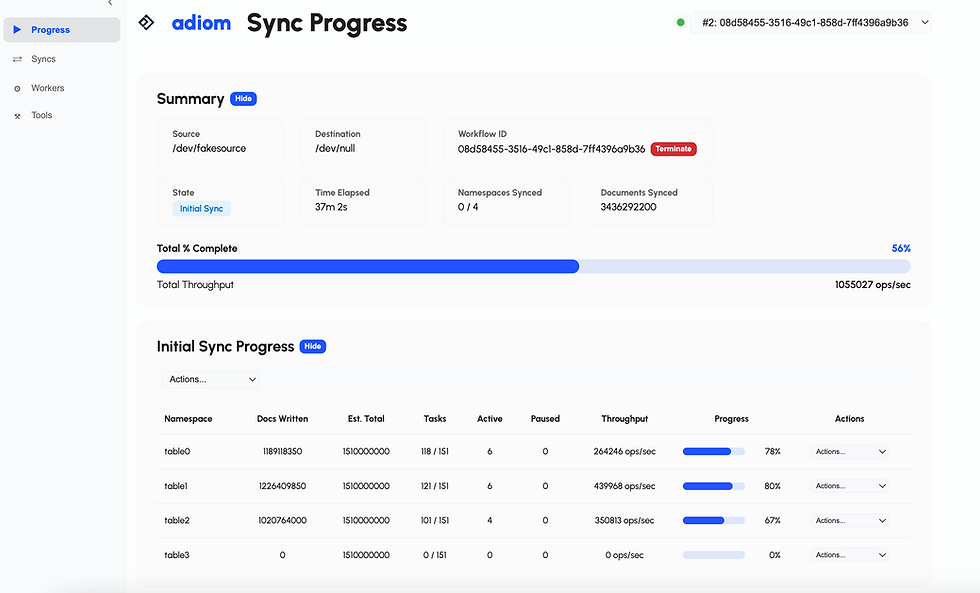
For production workloads - where you cannot afford an extended downtime window - Adiom's Dsync is the leading purpose-built tool for production NoSQL migrations. It performs an initial bulk copy followed by continuous change-data-capture replication, keeping source and target in sync so you can validate the target under real traffic and then cut over with minimal downtime. Critically, it is easy to set up - and stays easy even when you scale it horizontally to move large datasets quickly. You can run it on your laptop to migrate 100's of GB's, or in your Kubernetes cluster to migrate 100's of TBs. That combination of low setup friction and horizontal scalability is what sets it apart from the heavier built-in options, which trade setup complexity for capability.
The built-in Azure options have constraints worth knowing: DMS online migrations require DMS instances in the Premium tier, and are not supported against serverless Cosmos DB accounts. For DocumentDB/vCore specifically, RU-to-vCore migration is GA and free from the Azure portal.
Step 3 - Online migration and cutover
For minimal downtime, bulk-copy a snapshot, then continuously replicate changes until source and target converge - exactly the pattern Dsync automates. When replication lag is near zero, stop writes briefly, drain remaining changes, switch the application's connection string, and cut over. Offline migration, by contrast, incurs downtime for the entire copy duration.
Step 4 - Post-migration optimization
The only mandatory step is repointing your connection string - but cutting over before optimizing causes an immediate price/performance hit. Recommended:
Tune indexing. Cosmos DB for MongoDB 3.6+ indexes only _id by default; the NoSQL API indexes everything automatically. Disable or minimize indexing during bulk load, add indexes after.
Validate data, configure global distribution (≥ 2 regions for HA), and set the consistency level (default: session).
Monitor RU consumption via Azure Monitor and tune iteratively.
4. Success Stories
OpenAI / ChatGPT. The headline reference: "OpenAI relies on Cosmos DB to dynamically scale their ChatGPT service – one of the fastest-growing consumer apps ever – enabling high reliability and low maintenance" (Satya Nadella). At Cosmos DB Conf 2026, OpenAI detailed running thousands of product tables on Cosmos DB with multi-region replication across dozens of regions - a proof point that the database scales with one of the most demanding consumer workloads on the planet.
Novo Nordisk — migrating off a relational database (2025). A textbook cost-migration story: Novo Nordisk moved an application from an RDBMS setup costing ~$280/month to Azure Cosmos DB at under $1/month — while improving the end-user experience and reducing its carbon footprint. Presented at Cosmos DB Conf 2025.
Next - re-architecting for cost (2026). The UK retailer faced escalating RU costs on a production workload. By redesigning partitioning, indexing, and query shape — and moving from querying shared mutable state to event capture - Next cut its Cosmos DB costs by more than 60% with no loss of performance or reliability. The lesson, per the presenter: "the issue wasn't scale, it was design." (Conf 2026 production recap)
Office Depot / The ODP Group - AI agent memory (2026). ODP built an enterprise AI Personal Assistant on Azure Cosmos DB, using it as the agent memory layer - per-user partitioned profiles and analytics. Employee adoption nearly doubled year-over-year, with database scaling described as "hands-off" - no manual re-architecture as load grew. (Conf 2026 production recap)
KPMG - agentic AI audit (2025). KPMG Clara AI uses Cosmos DB for chat history, session data, and agent memory. It serves 95,000 auditors across 140+ countries and processes petabytes of data annually - scale KPMG states would be impossible without Cosmos DB's ability to deploy globally without re-architecting per jurisdiction.
Takeaways
Don't get lost in the terminology: Cosmos DB for NoSQL (the engine formerly branded the Cosmos DB SQL API) versus Azure DocumentDB (vCore), built on the open-source DocumentDB engine.
Compare Azure DocumentDB against MongoDB Atlas and AWS DocumentDB - the deciding factors are price, premium storage, and native integrations. Compare Cosmos DB for NoSQL against DynamoDB and Cassandra - the wins are richer querying, tunable consistency, and managed global distribution.
The partition/shard key is immutable - get key design and capacity planning right before moving a single document.
For production migrations, prefer continuous replication with a minimal-downtime cutover, and weigh ease of setup alongside capability. Adiom's Dsync is purpose-built for this: easy to set up, horizontally scalable, and free of the offline-copy downtime that the built-in tools incur.


Comments